Most guides treat Stripe affiliate tracking like a one-and-done setup: you paste a script, run a test payment, and assume the job is finished. But real subscription billing is messy — customers upgrade, downgrade, pause plans, and request refunds. If your affiliate tracking software only captures the initial checkout, your commission payouts quickly drift out of sync with reality.
Rewardful solves this with a direct two-way Stripe sync that maps to your entire billing lifecycle, automatically keeping your payouts accurate as subscriptions evolve.
Here is how to set up Stripe affiliate tracking — from connecting your account and configuring campaign terms to testing your full billing cycle before launching your program.
How to Set Up Stripe Affiliate Tracking in 6 Steps
You need three things before starting: a Stripe account with live billing (subscriptions or one-time products), the ability to add a script to your website or use one of the no-code integrations from Rewardful, and a decision-maker's answer on what commission you want to pay.
Step 1: Connect Your Stripe Account
Rewarful supports a two-way Stripe integration, so setting this up is easy and quick.
Create your Rewardful account and click Connect with Stripe. You are redirected to Stripe to authorize access, then returned to Rewardful to continue setup. That single authorization is what enables the platform to read billing events (payments, invoices, refunds, subscription changes) rather than only the initial checkout.
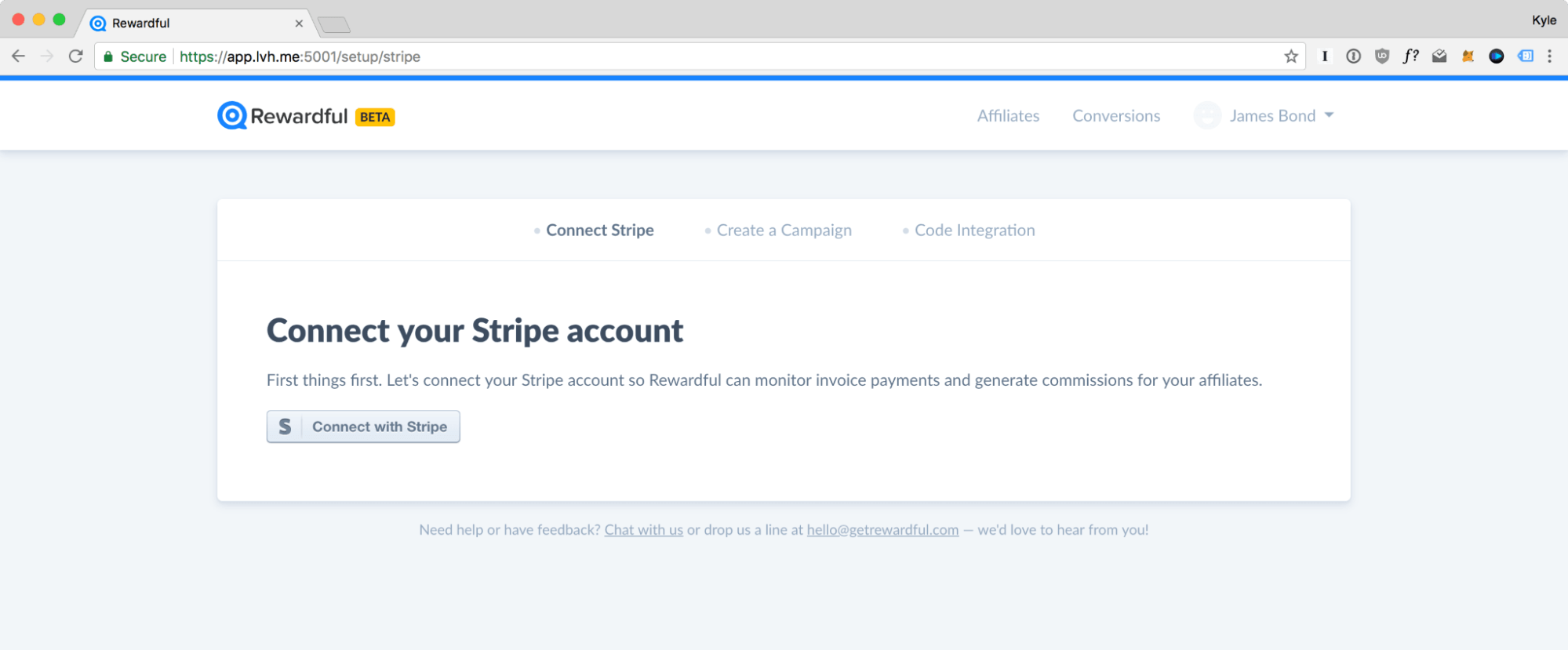
No code is involved in this step, and no engineering ticket is needed. Here’s our help guide on how to connect your Stripe account with Rewardful if you need guidance.
Step 2: Choose Your Affiliate Commission Structure
Decide on two things: whether it's recurring or one-time, and whether it's a percentage-based or fixed affiliate commission model.
- For subscription businesses, a recurring percentage commission is the usual choice because it is calculated on each actual invoice and rises and falls with the customer's actual plan.
- A fixed commission pays the same amount regardless of what the customer later upgrades or downgrades to, which suits one-time purchases and lifetime deals better than subscriptions.
For a deeper breakdown of the options and typical rates, see Affiliate Commission Explained.
Step 3: Set Your Cookie Window, Payout Terms, and Minimum Payout Threshold
These three settings live at the campaign level.
- The cookie window decides how long after a click a signup still counts as referred (30, 60, and 90 days are all common). Longer windows favor affiliates with slower audiences, like newsletter writers).
- Payout terms decide when a commission becomes due. Holding commissions for a period such as NET-30 or NET-60 means most refunds happen before you pay, not after.
- The minimum payout threshold sets the smallest balance you will pay out at once. Learn how to set up a minimum payment here.
Set it now, before anyone earns anything. Changing payment rules on affiliates after they have started earning is how programs lose partners.
Step 4: Add Tracking to Your Site
Add the Rewardful script to your website by copy-pasting the snippet, or use a no-code integration if your stack has one. Once installed, affiliate links point to your own domain with a simple parameter (yoursite.com?via=partner) rather than a third-party redirect, and affiliates can link to any page on your site, a pricing page, a comparison post, or a feature page without generating a separate tracking link for each.
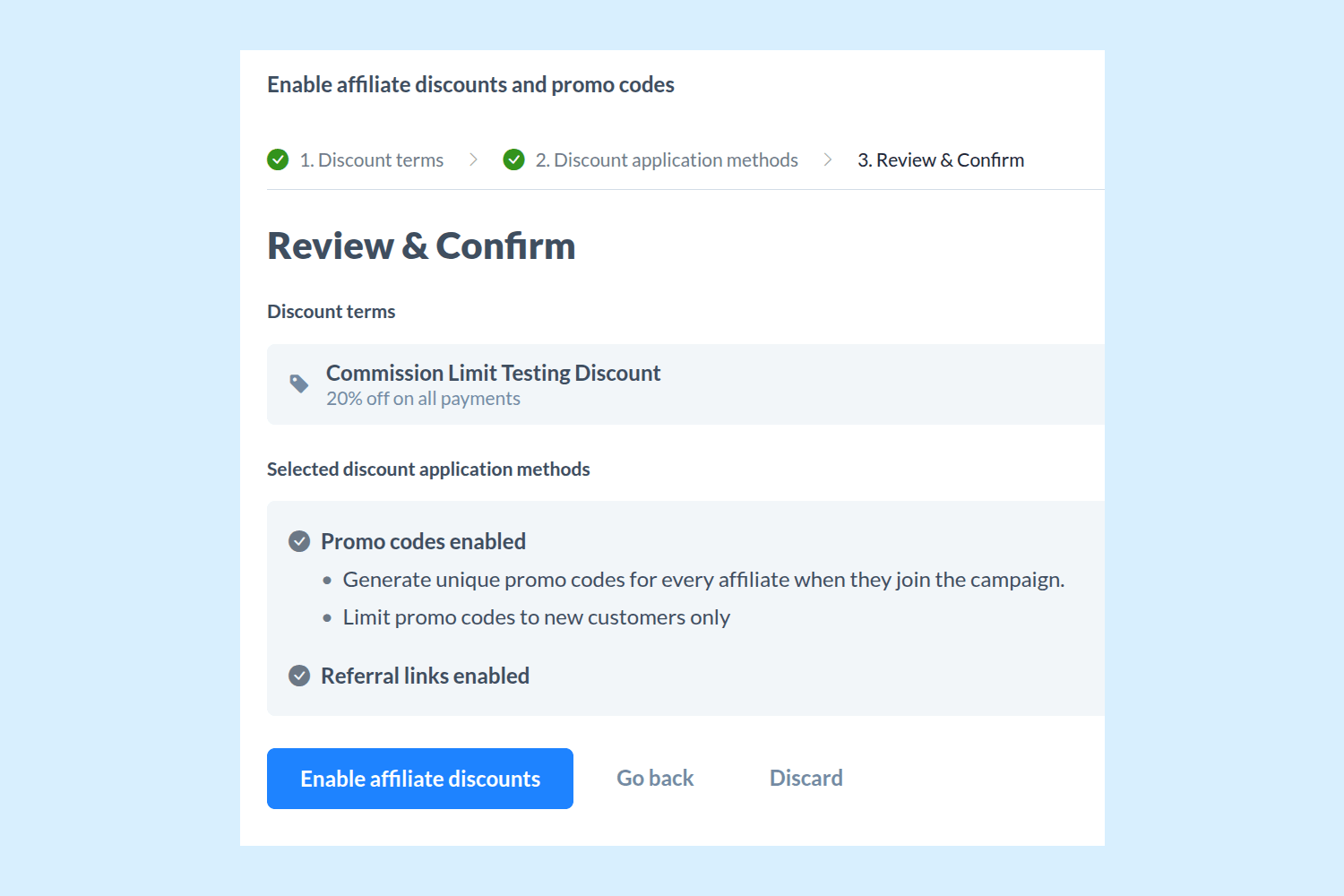
The script links the visitor's click to the subsequent Stripe checkout. If your affiliates promote on podcasts, YouTube, or social media, where a link is impractical, coupon code tracking attributes the sale when the customer redeems the affiliate's code instead. Follow the affiliate coupon code setup guide to enable it.
Step 5: Test the Full Subscription Lifecycle
This is the step generic tutorials skip, but it is make-or-break level essential. Run a test referral: click your own affiliate link, complete checkout, and confirm the conversion appears under the correct affiliate.
Then keep going. Upgrade that test subscription in Stripe and verify that the commission increases. Downgrade it and check the commission follows. Cancel it, issue a refund on a paid invoice, and confirm the commission is corrected rather than left standing. Since Rewardful has an automatic refund handling feature, this should be covered for you by default.
Fifteen minutes of testing here saves you from discovering a tracking gap in month three, when an annoyed affiliate asks why their dashboard shows a different number than they expected.
Step 6: Confirm Billing Events Are Syncing, Then Invite Your Affiliates
Before going live, check that your dashboard reflects all billing events, not only signups: the lifecycle changes you made in step 5 should all be visible.
With Rewardful's Stripe two-way sync, affiliate and referral data are also visible from inside your Stripe dashboard, which gives you a second place to confirm that the two systems agree. When they do, open your branded affiliate portal and start inviting your Stripe affiliates to join and grab their links.
Need some help in recruiting affiliates? Try our Affiliate Outreach Generator tool to draft outreach emails and find LinkedIn creators.
Why One-Way Sync Breaks Stripe Affiliate Tracking Accuracy
A lot of affiliate tracking software connects to Stripe through a one-way webhook: Stripe pushes a notification when a checkout completes, the tool records a conversion, and the connection has done its job. That works on day one, but it may stop working the first time a referred customer changes anything. This is because a signup-only integration has no reason to revisit a conversion it has already recorded.
For example, a referred customer signs up on a $29/month plan with a 20% recurring commission, so the affiliate earns $5.80/month. Three months in, the customer upgrades to the $99 plan. A one-way integration keeps paying $5.80 against a customer now worth $99, and the affiliate who drove the upgrade-quality referral is underpaid by two-thirds.
Flip the scenario, and it gets worse: the customer downgrades or refunds, the tool keeps the original commission on the books, and you are overpaying until someone notices and reconciles by hand. Multiply either case across fifty Stripe affiliates and the program's numbers stop meaning anything.
A two-way Stripe sync from Rewardful fixes that disconnect by treating the conversion as a living record. When a customer is created or updated in Stripe, Rewardful checks whether that customer was referred, records the conversion, and then keeps tracking the customer's subsequent activity: upgrades, downgrades, cancellations, and refunds all flow back into the commission. The sync runs in both directions, so the affiliate data is also visible from your Stripe dashboard. Here’s a more detailed explanation of how Rewardful tracks and pays affiliate commissions.
If you manage a program day-to-day and want the fuller picture of what that visibility changes, we cover it in Rewardful's Stripe sync for affiliate managers.
Common Stripe Affiliate Tracking Mistakes
1. Assuming the commission follows the signup price
A customer who signs up on a $29 plan and upgrades to $99 is a different commission, unless you choose a fixed amount commission model. Percentage commissions track real invoices; fixed commissions do not move. Neither choice is wrong, but pick one knowing how it behaves at renewal, and make sure your affiliate terms describe the same behavior your settings produce.
2. Launching an affiliate program without a minimum payout threshold
Without one, your first payout run is a pile of $3 commissions, each with its own transfer overhead, and any refund that lands after payment becomes money you claw back from a partner. A threshold plus NET payout terms costs affiliates nothing (the balance rolls forward) and removes both problems before they exist.
3. Testing only the first affiliate payment
A test checkout that shows one conversion proves the happy path and nothing else. The failures that damage affiliate trust live in the upgrade, downgrade, cancel, and refund paths, and you can only see them by walking the whole lifecycle once before launch.
Stripe Affiliate Tracking: Go-Live Checklist
Before your first affiliate shares a link, confirm:
- Stripe account connected and authorized, with billing events visible in your affiliate dashboard
- Commission structure chosen (recurring vs. one-time, percentage vs. fixed) and matching your affiliate terms
- Cookie window, payout schedule, and minimum payout threshold set at the campaign level
- Tracking script or integration live on your site, with a test link resolving to your own domain
- Full lifecycle tested: signup, upgrade, downgrade, cancellation, and refund all reflected in the commission
- Affiliate portal branded and ready for your Stripe affiliates to join
Set Up Your Stripe Affiliate Program with Rewardful
If you bill through Stripe, Rewardful gives you the two-way Stripe sync affiliate tracking set up, plus affiliate coupon codes, mass payouts, and a branded portal. Start your 14-day free trial, and you can have Stripe affiliate tracking configured and lifecycle-tested before the trial's first hour is up.