
Paying affiliates sounds simple — until you factor in recurring commissions, refunds, payout thresholds, and compliance. The mechanics of affiliate payouts matter, and the wrong setup quickly creates operational overhead as your program scales.
This guide covers how Rewardful handles the full affiliate payout flow on Stripe: how commissions are calculated from your Stripe data, how payout timing and thresholds work, and what payout methods are available, including Managed Payouts, as well as PayPal and Wise bulk affiliate payment.
How Rewardful Tracks Commissions From Stripe Data
When you connect Rewardful to your Stripe account, Stripe sends Rewardful a webhook notification every time a relevant event occurs, such as a new customer, a paid invoice, or a refund. Rewardful reads those events and checks whether the customer was referred by one of your affiliates. If they were, it logs a commission immediately.
You set your commission rules once on Rewardful. After that, every Stripe payment event is handled automatically.
Rewardful tracks the following Stripe and affiliate activities without manual input:
- Recurring affiliate commissions: Every time a referred customer renews their subscription, Rewardful picks up the invoice payment and generates a new commission. You don't touch it per renewal.
- Automated refund handling: When Stripe sends a refund notification, Rewardful recalculates the commission on that invoice — full refund removes it, partial refund adjusts it. The payout list remains accurate.
- Upgrades and downgrades: Commission adjusts to reflect what the customer actually paid, not what they were originally charged. This includes any billing upgrade or downgrade to your SaaS products.
The deep integration between Rewardful and Stripe payments works because of Rewardful’s Two-Way Stripe Sync — affiliate data, coupon codes, and transaction records stay in sync across both platforms in real time. This means a change in Stripe is reflected in Rewardful immediately.
How Rewardful Processes Affiliate Payouts (Timing and Payment Thresholds)
Every commission in Rewardful moves through two stages before it gets paid out.
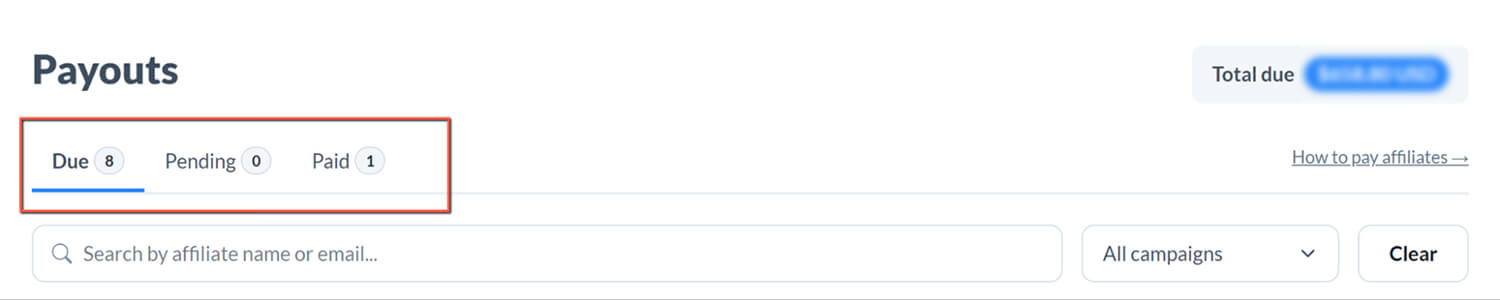
Pending is the holding stage. When a commission is generated, it sits here until it clears your refund window. You set that window yourself. Most SaaS companies use 30 days, but it should match your actual refund policy. The point is simple: you're paying on confirmed revenue, not revenue that might get reversed.
Once the refund window passes, the commission moves to Due. Due means cleared and ready to pay. Your affiliate payout runs work from the Due queue.
For a full walkthrough of how commissions move through each stage, see How do I pay commissions?
Payout threshold is worth configuring before your affiliate count grows. It sets a minimum balance an affiliate needs to reach before they're included in a payout cycle. Without it, you'll end up processing small-balance payouts at scale, which can lead to more transactions, more fees, and more admin overhead for both sides.
Learn how to set a minimum payout threshold for your affiliate campaign.

3 Ways to Pay Your Affiliates With Rewardful and Stripe Integration
Rewardful supports three affiliate payout methods. Which one fits depends on how hands-on you want to be and how many affiliates you're paying. All three are supported by Rewardful's Stripe integration
1. Managed Payouts
Managed Payouts is Rewardful's most streamlined option to handle all your affiliate payment efforts. Here’s how Managed Payouts works: you fund a single payment to Rewardful; Rewardful distributes the commissions to each affiliate from there. No CSV exports, no uploading to a third-party platform, no chasing invoices or tax forms.

Who Managed Payouts Is For
Managed Payouts by Rewardful is especially handy for companies that process many affiliate commission payments but don’t want to deal with the tedious administrative work. This includes handling tax forms and affiliate invoices.
What You Need to Set Up Managed Payouts
Rewardful’s Managed Payouts requires connecting your bank account via Stripe's ACH debit process. Once verified, all you have to do is go to Payments, select the commissions you want to fund, and make a single payment for all your affiliates. Rewardful will distribute each affiliate's commissions in 3–5 business days with a small 3% processing fee.
How Managed Payouts Work for Affiliates
Affiliates choose their withdrawal method during onboarding — local bank transfer, SEPA, wire transfer, PayPal, or check — and enter their details once. From there, they withdraw earnings directly from their Rewardful dashboard with a withdrawal fee (shared upfront).
Full details on fees, setup, and affiliate withdrawal options: Managed Payouts.
2. PayPal and Wise Mass Payouts
If you prefer to handle affiliate commission payout yourself, Rewardful supports PayPal and Wise batch payments. This is perfect for SaaS affiliate programs with a high volume of monthly affiliates to pay (up to 5,000 affiliates in a single batch).
Who PayPal and Wise Affiliate Payout Is For
Rewardful’s PayPal and Wise affiliate payouts are perfect for SaaS affiliate programs with a high volume of monthly affiliates to pay and who already use PayPal or Wise as their payment method. Instead of individual transfers, save time by making the payment to up to 5,000 affiliates in a single batch.
What You Need to Set Up PayPal and Wise Affiliate Bulk Payment
The process is simple. Once you integrate your PayPal account to Rewardful, download the due payouts CSV from your Rewardful dashboard. Then, upload it to PayPal and process the payment. Once done, mark the payouts as complete in Rewardful. A similar process is applied for Wise affiliate payout.
Note: PayPal mass pay requires a verified PayPal Business account; Wise batch payments require a verified Wise Business account. More on the PayPal and Wise bulk payout flow on Rewardful.
3. One-Click PayPal Affiliate Payouts
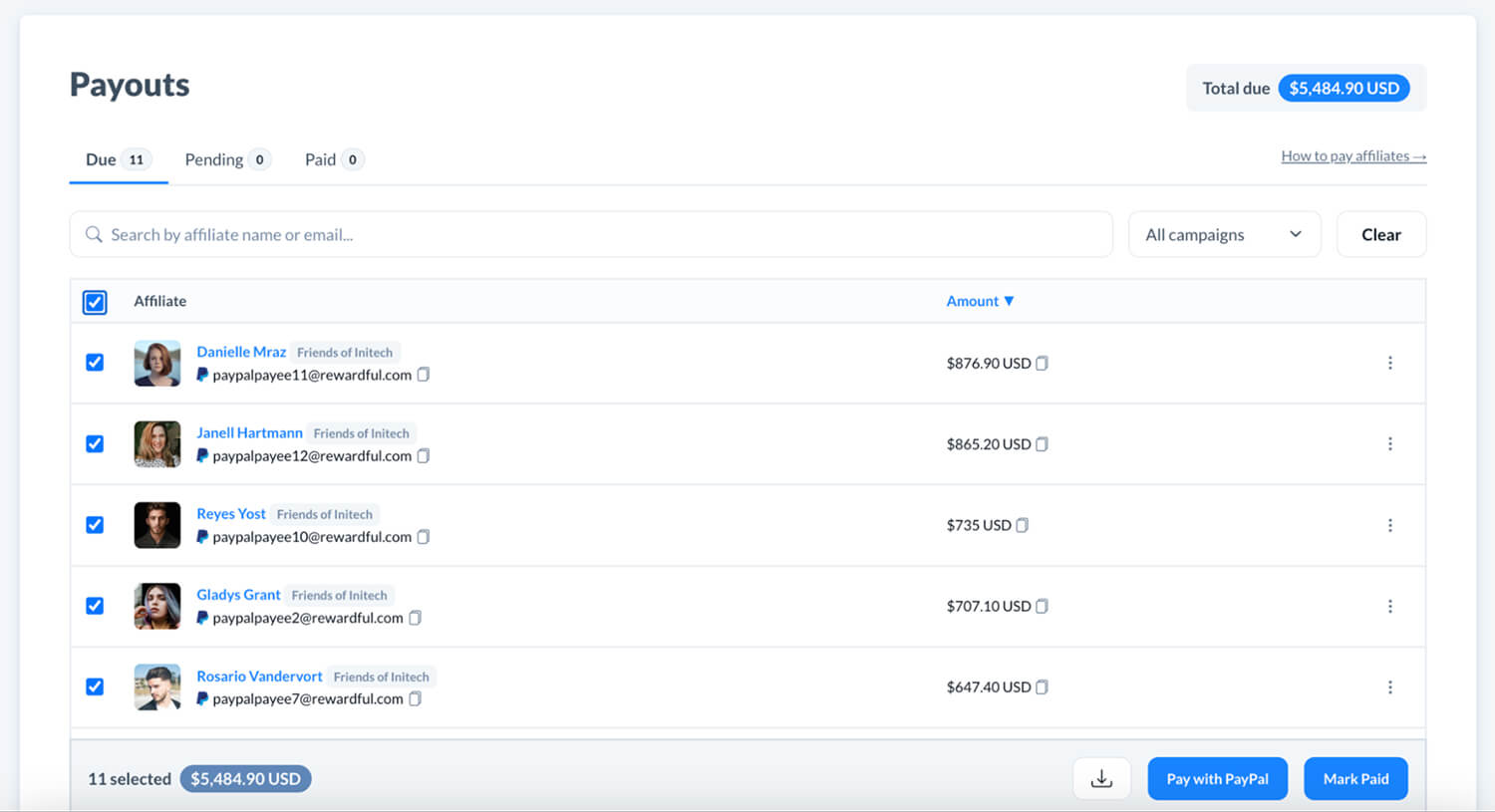
Rewardful also lets users pay affiliates directly from the dashboard via one-click PayPal payouts — no CSV download, no switching between tools.
Who One-Click PayPal Affiliate Payouts Are For
The One-Click PayPal Affiliate Payment is limited to enterprise-plan merchants who want to skip the CSV flow entirely and process PayPal payouts without leaving Rewardful.
What You Need to Set Up One-Click PayPal Payouts
You'll need a verified PayPal Business account with mass payout permissions enabled. Once set up, payouts run directly from your Rewardful dashboard in a few clicks.
Read this guide to set one-click PayPal payouts on Rewardful.
How Rewardful Payout Benefits Affiliates
Affiliates have their own Rewardful dashboard showing referrals, conversions, commissions earned, and payout status in real time. They can see exactly what they've earned and when to expect payment — without emailing you to ask.
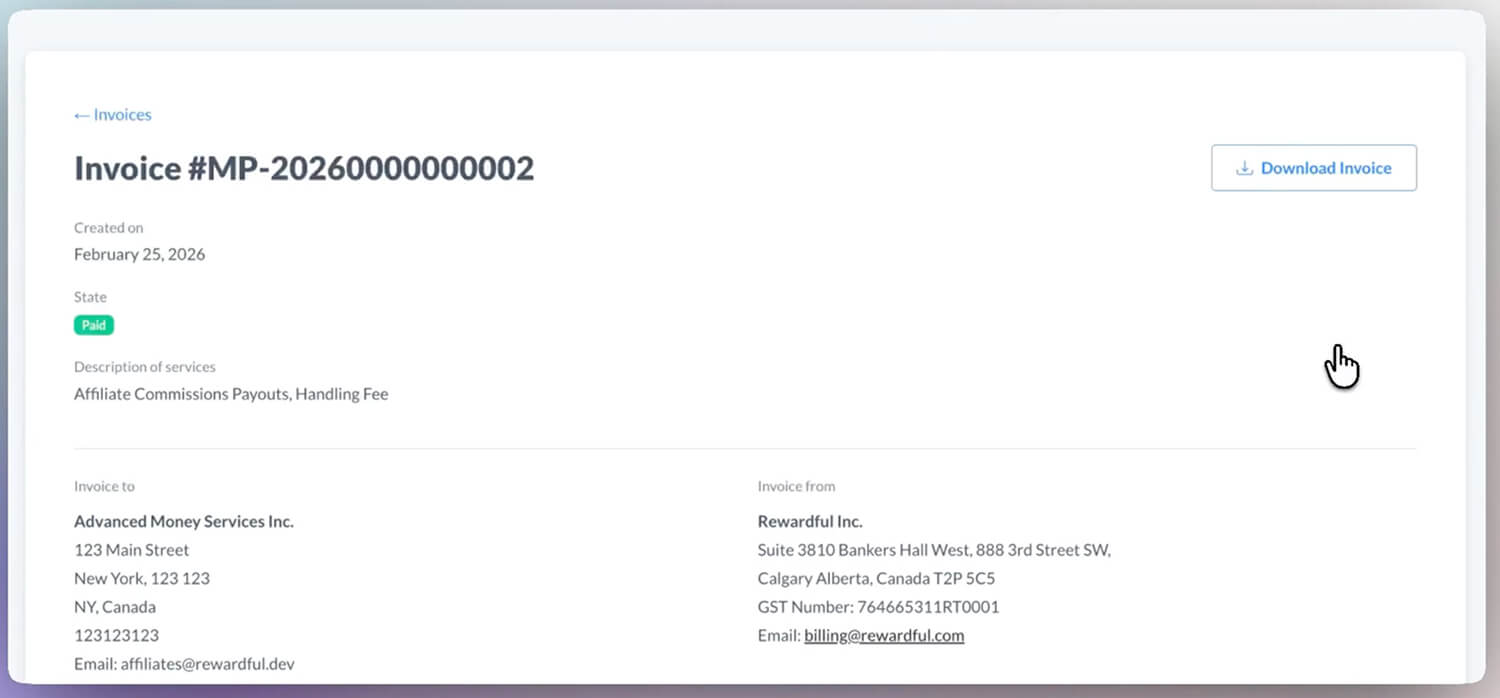
Automatically generated invoices are available for download, which removes back-and-forth for affiliates who need documentation for their own accounting.
Rewardful Makes Affiliate Payment Simple
If you're on Stripe and want to see the payout flow in practice, Rewardful's 14-day free trial lets you connect your account, configure a campaign, and run through the full workflow. Give Rewardful a try today.
FAQs - Rewardful Affiliate Payment and Stripe Integration
What Affiliate Payout Methods Does Rewardful Support?
Rewardful supports three affiliate payout methods: Managed Payouts, PayPal/Wise mass payments, and One-Click PayPal payments. Managed Payouts is the most hands-off option — you fund one payment and Rewardful handles distribution. PayPal and Wise use a CSV export flow you upload directly to either platform. You can pay up to 5,000 affiliates in a single batch. One-Click PayPal payment allows you to reward your affiliates directly from Rewardful.
Can I Manually Attribute an Existing Stripe Customer to an Affiliate in Rewardful?
Yes, you can manually associate that Stripe customer with an affiliate directly from your Rewardful dashboard. If a customer converted outside of tracked attribution — for example, they clicked an affiliate link on mobile but signed up later on desktop. Rewardful will then generate commissions for future invoices, and optionally for past invoices already paid. Full instructions here.
Does Rewardful Read or Write Data to My Stripe Account?
Rewardful primarily reads data from your Stripe account via webhooks — customer records, invoice payments, and refunds. It writes a small amount of metadata back to Stripe customers and invoices so you can reconcile Rewardful conversions directly in your Stripe dashboard. No payment processing happens through Rewardful's connection to Stripe.